
3. NumPy Arrays#
Click on the figure to enlarge it for clearer view
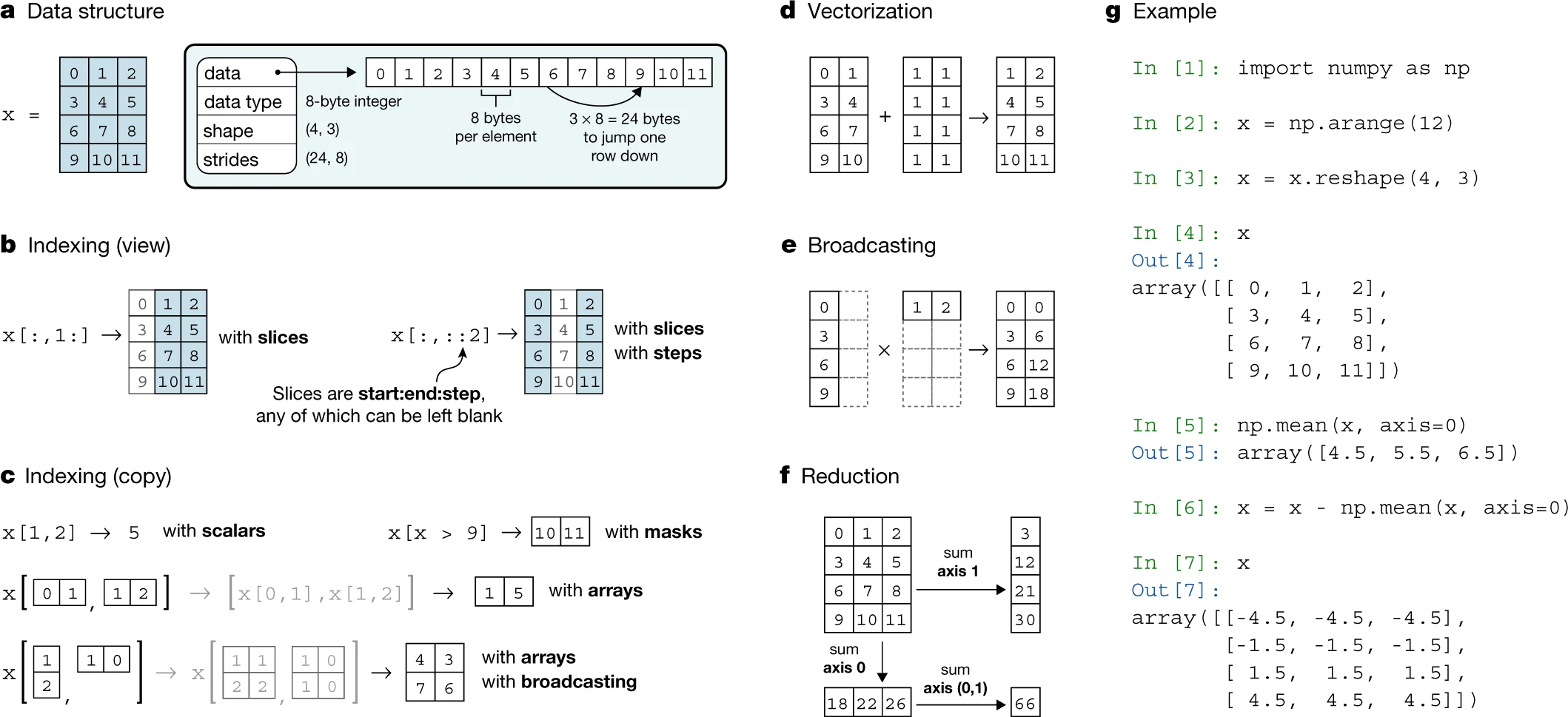
Fig. 3.1 Numpy Array Concepts #
NumPy organizes array operations along axes, masks, and broadcasting rules. Fig. 3.1 above summarizes how these concepts interact when reducing or slicing arrays [Harris et al., 2020].
NumPy, short for Numerical Python, is the foundation for Python’s data science ecosystem. Nearly all Python libraries for data science, machine learning, and scientific computing—including pandas, scikit-learn, and TensorFlow—build on NumPy. Understanding NumPy means understanding how these tools work under the hood.
NumPy’s core strength is its ndarray (N-dimensional array), which provides fast, memory-efficient operations on large datasets through built-in tools for math, statistics, and linear algebra.
What You'll Learn
This chapter covers NumPy fundamentals with emphasis on practical array operations:
NumPy Basics
Creating arrays
Array attributes (shape, dtype, ndim)
Indexing and slicing
Reshaping and concatenation
Universal Functions (ufuncs)
Vectorized operations
Element-wise arithmetic
Comparison and Boolean operations
Broadcasting rules
Random Number Generation
Random sampling
Statistical distributions
Reproducible randomness with seeds
Simulation techniques
NumPy provides built-in tools for math, statistics, and linear algebra. NumPy makes numerical computing in Python fast, efficient, and powerful.
As an introduction, we need to learn the following about NumPy with an emphasis on ndarrays:
Basics of NumPy arrays
Data Structure
Creating Arrays
NumPy Random Module
Indexing and Selection
Array Attributes
NumPy array operations
2.1. Vectorized Operation
2.2. Arithmetic ufuncs
Aggregation
Advanced Features:
Aggregations
Broadcasting
Comparison
Fancy indexing
Sorting
NumPy Randomness
import numpy as np

a = np.array([1, 2, 3])    # from list
z = np.zeros((2, 3))        # 2x3 zeros
o = np.ones((3, 2))         # 3x2 ones
f = np.full((2, 2), 7)      # 2x2 filled
r = np.arange(0, 10, 2)     # 0..8 step 2
l = np.linspace(0, 1, 5)    # 5 points 0..1
i = np.eye(3)               # 3x3 identity
a.shape     # dimensions
a.ndim      # number of axes
a.size      # total elements
a.dtype     # data type
a.nbytes    # memory bytes

b = a.astype(np.float32)  # cast dtype
np.int32; np.int64         # common ints
np.float32; np.float64     # common floats
m = np.array([[1,2],[3,4]])

m[0]           # first row
m[-1]          # last row
m[1, 0]        # element
m[0, :]        # row slice
m[:, 1]        # column slice
m[m > 2]       # boolean mask
m[[0,1],[1,0]] # fancy index
x = np.arange(6)
x2 = x.reshape((2, 3))    # 2x3 view
x2.T                        # transpose
x[:, np.newaxis]            # add dim
x.flatten()                 # copy 1D
x.ravel()                   # view 1D
x2 + np.array([10,20,30])  # broadcast
x2 + 5                      # scalar broadcast
np.sum(m)             # total sum
np.mean(m)            # mean
np.min(m); np.max(m)  # min, max
np.std(m); np.var(m)  # std, var
np.sum(m, axis=0)     # col sum
np.sum(m, axis=1)     # row sum
np.cumsum(x)          # cumulative sum
np.clip(x, 0, 3)      # clamp
rng = np.random.default_rng(42)
rng.random(5)              # uniform [0,1)
rng.integers(1,10,size=5)  # ints
rng.normal(0,1,size=5)     # normal
rng.choice([1,2,3],size=2) # sample
p = rng.permutation(5)     # permuted idx
rng.shuffle(x)             # in-place
rng.uniform(5,10,size=3)   # range
A = np.array([[1,2],[3,4]])
b = np.array([[5],[6]])
A @ b                  # matrix multiply
np.dot(A, b)           # same result
np.linalg.inv(A)       # inverse
np.linalg.solve(A, b)  # solve Ax=b
np.linalg.eig(A)       # eigenvalues
np.linalg.norm(A)      # norm
np.save('x.npy', x)           # save binary
x2 = np.load('x.npy')         # load binary
np.savetxt('x.csv', x,
    delimiter=',')             # save csv
x3 = np.loadtxt('x.csv',
    delimiter=',')
np.savez('d.npz', x=x, A=A)   # multiple
d = np.load('d.npz')
d['x']                         # access array
d.files                        # list keys
# prefer vectorized ops over loops
y = (x * 2) + 1           # vectorized
v = x.view()               # shallow view
c = x.copy()               # deep copy
np.shares_memory(x, v)     # check sharing
np.where(x > 2, 1, 0)      # fast condition
np.isclose(0.1+0.2, 0.3)   # float compare
x = x.astype(np.float32)   # reduce memory