
2.5. Functions#
Built-in vs custom functions: Python ships with functions like print() and len(), and you can also create your own custom functions.
2.5.1. Built-in Functions#
In Python, built-in functions and built-in modules are both part of the standard tools the language gives you, but they serve different purposes. Built-in functions are ready to use without requiring any imports. They are automatically available in every Python program.
Python built-in functions are tools for quick operations (such as length, conversion, and output). A few of them that you will use constantly:
print("Hello!")              # Output to screen

len_num = len([1, 2, 3])     # 3: len() get the length of the argument
num = int("42")              # 42 (string → int); int() is a type constructor
sum_num = sum([1, 2, 3])     # 6 (sum a list sequence)
max_num = max(5, 2, 9)       # 9

print(len_num)
print(num)
print(sum_num)
print(max_num)
Hello!
3
42
6
9
In the Python Standard Library , you can find all the Python built-in functions listed:
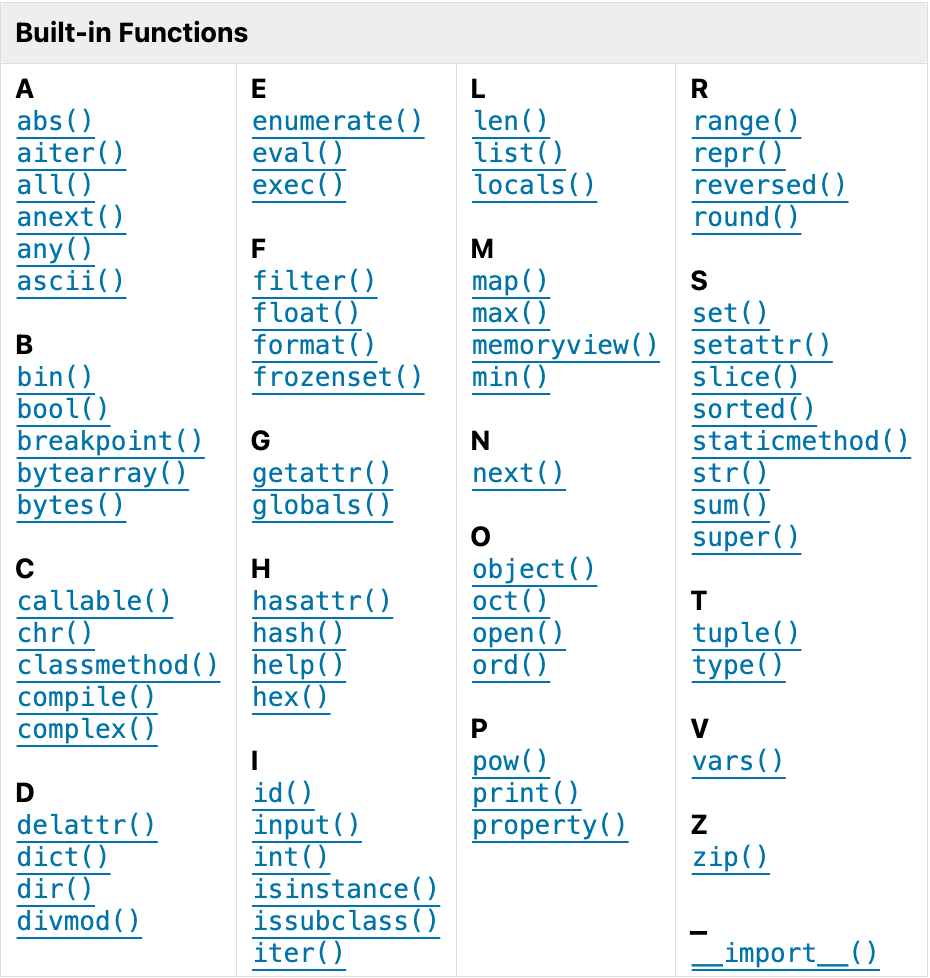
Fig. 2.5 Python Built-In Functions #
Some built-in functions work together. For example:
Group |
Functions |
Notes |
|---|---|---|
Numbers & math |
|
|
Type construction |
|
Convert or construct core types. |
Object/attribute introspection |
|
type() checks object types; id() shows object ID |
Iteration & functional tools |
|
Prefer comprehensions when clearer. |
Sequence/char helpers |
|
|
2.5.2. Functions (User-Defined)#
While Python’s built-in functions are useful, the real power of programming comes from creating your own functions.
A function definition specifies the name of a new function and the sequence of statements that run when the function is called.
A function is a reusable block of code that performs a specific task. Functions help you organize code, avoid repetition, and make programs easier to understand and maintain.
Use the def keyword to define a function. Key components of a function include:
def: Keyword that starts a function definitionFunction name: Follows variable naming rules (snake_case)
Parameters: Input values (optional)
Docstring: Documentation string (recommended)
Function body: Indented (instead of
{}) code that runs when the function is called
2.5.2.1. Defining a Function#
Here’s an example:
def print_lyrics():
    print("I'm a lumberjack, and I'm okay.")
    print("I sleep all night and I work all day.")
The first line of the function definition is called the header, the rest is called the body.
In the header we see three things:
defis a keyword that indicates that this is a function definition.The
function nameof this function isprint_lyrics. Anything that’s a legal variable name is also a legal function name.The empty
parenthesesafter the name indicate that this function doesn’t take any arguments.The header has to end with a
colon.
In the body of this function we see that:
The body is
indented. The Python Enhancement Proposal 8 (PEP8 ), the Python style guide, says “Use4 spacesper indentation level”.The body of a function can contain any number of statements of any kind.
In this function, the body is two print statements.
Defining a function creates a function object, which we can display like this:
print_lyrics
<function __main__.print_lyrics()>
The output indicates that print_lyrics is a function that takes no arguments.
__main__ is the name of the module that contains print_lyrics.
### Exercise: Defining Function
#1. Define a function named "hello", which prints "hello, there" when called
#2. Showing the function object
#3. Produce the same result as shown below.
### Your code starts here


### Your code ends here
<function __main__.hello()>
2.5.2.2. Calling a Function#
Now that we’ve defined a function, we can call it (make a function call) the same way we call built-in functions:
print_lyrics()
I'm a lumberjack, and I'm okay.
I sleep all night and I work all day.
When the function runs, it executes the statements in the body, which display the first two lines of “The Lumberjack Song”.
2.5.2.2.1. Parameters & Arguments#
Some of the Python built-in functions we have seen require arguments; for example, when you call abs, you pass a number as an argument.
The print_lyrics() does a simple print and is with no parameters.
Functions can take one or more arguments; for example, abs() takes one, math.pow takes two: the base and the exponent.
import math

print(abs(-1000))       ### 1 arg
print(math.pow(2, 3))   ### 2 args
1000
8.0
2.5.2.2.2. With one parameter**#
Parameters allow functions to work with different inputs. Compare the greet() and greet_personp() functions, and you should see that parameters enhance the functionality of functions.
def greet():
    print("Good morning!")

greet()
Good morning!
def greet_person(name):
    print(f"Hello, {name}!")

greet_person("Alice")  # Output: Hello, Alice!
greet_person("Bob")    # Output: Hello, Bob!
Hello, Alice!
Hello, Bob!
Similarly, here is a definition for a function that takes an argument:
def print_twice(string):
    print(string)
    print(string)
The variable name in parentheses is a parameter.
When the function is called, the argument’s value is assigned to the parameter.
For example, we can call print_twice like this.
print_twice('Spam')
Spam
Spam
Running this function has the same effect as assigning the argument to the parameter and then executing the function’s body.
string = 'Spam'
print(string)
print(string)
Spam
Spam
You can also use a variable as an argument.
line = 'Spam, Spam, Spam, Spam'
print_twice(line)
Spam, Spam, Spam, Spam
Spam, Spam, Spam, Spam
In this example, the value of line gets assigned to the parameter string.
2.5.2.2.3. Multiple Parameters#
Once you have defined a function, you can use it inside another function. To demonstrate, we’ll write functions that print the lyrics of “The Spam Song” (https://www.songfacts.com/lyrics/monty-python/the-spam-song ).
Spam, Spam, Spam, Spam,
Spam, Spam, Spam, Spam,
Spam, Spam,
(Lovely Spam, Wonderful Spam!)
Spam, Spam,
We’ll start with the following function, which takes two parameters.
def repeat(word, n):
    print(word * n)
We can use this function to print the first line of the song, like this:
repeat('Spam, ', 4)
Spam, Spam, Spam, Spam,
To display the first two lines, we can define a new function that uses repeat:
### Exercise: Defining & Calling a Function
#1. Define a function named "add_two" with two parameters
#2. When called, the function prints the sum of the two number args
### Your code starts here


### Your code ends here
The total is 5.
2.5.2.3. Function Composition#
def first_two_lines():
    repeat('Spam, ', 4)
    repeat('Spam, ', 4)
And then call it like this:
first_two_lines()
Spam, Spam, Spam, Spam,
Spam, Spam, Spam, Spam,
To display the last three lines, we can define another function, which also uses repeat:
def last_three_lines():
    repeat('Spam, ', 2)
    print('(Lovely Spam, Wonderful Spam!)')
    repeat('Spam, ', 2)
last_three_lines()
Spam, Spam,
(Lovely Spam, Wonderful Spam!)
Spam, Spam,
Finally, we can bring it all together with one function that prints the whole verse.
def print_verse():
    first_two_lines()
    last_three_lines()
print_verse()
Spam, Spam, Spam, Spam,
Spam, Spam, Spam, Spam,
Spam, Spam,
(Lovely Spam, Wonderful Spam!)
Spam, Spam,
When we run print_verse, it calls first_two_lines, which calls repeat, which calls the built-in print function.
That’s a lot of functions.
Of course, we could have done the same thing with fewer functions, but the point of this example is to show how functions can work together.
2.5.2.3.1. Nested Function Calls#
Nesting function calls refers to directly calling one function inside another’s parentheses, creating a deep expression. It’s a common syntax for passing a value to a series of operations in a single line.
def add_one(x):
    return x + 1

def square(x):
    return x * x

### Nested function calls
result = square(add_one(5)) # (5 + 1) ^ 2 = 36
2.5.2.3.2. Returning Value#
Most functions send a value back to the caller.
def function_name(PARAMS):
    """
    Docstring describing what the function does.
    """
    # Function body
    return value
Function with parameters and Return
def add_numbers(a, b):
    """Add two numbers and return the result."""
    result = a + b
    return result               ### RETURN!!! ###

add_numbers(5, 3)               # Returns 8
sum2 = add_numbers(10, 20)      # Returns 30 and SAVED to sum2
### Exercise: Function in Function
#1. Define a function named "hellos" that takes 1 parameter:  an integer
#2. When called, hellos calls the "hello" function earlier n (the number of the integer) times
#3. Try to produce the same result shown below.
### Your code starts here


### Your code ends here
hello, there
hello, there
hello, there
hello, there
hello, there
2.5.2.4. Docstrings#
Docstrings (documentation strings) are used to document functions/methods, classes, and modules. They use triple quotes and should be the first statement after defining a function or class.
### Function with docstring
def greet(name):
    """
    This function does xxx and yyy.         ### 1. what this function is about

    Args:                                   ### 2. input parameters
        name: The person's name (string)

    Returns:                                ### 3. what the function returns
        A greeting message (string)
    """
    return f"Hello, {name}!"

message = greet("Homer")       ### call the function
print(message)
Hello, Homer!
2.5.3. Repetition#
If we want to do something more than once, we can use a for statement. Here’s a simple example using range() to control the number of iterations.
lullabi = "Twinkle, Twinkle, Little Star"

for i in range(2):
    print(lullabi)
Twinkle, Twinkle, Little Star
Twinkle, Twinkle, Little Star
You can put a for loop inside a function. For example, the function print_lullaby (n) takes a parameter named n, which has to be an integer, and displays the given number of verses.
def print_lullaby(n):
    for i in range(n):
        print(lullabi)
print_lullaby(5)
Twinkle, Twinkle, Little Star
Twinkle, Twinkle, Little Star
Twinkle, Twinkle, Little Star
Twinkle, Twinkle, Little Star
Twinkle, Twinkle, Little Star
2.5.4. List Arguments#
When you pass a list to a function, the function gets a reference to the
list. If the function modifies the list, the caller sees the change. For
example, pop_first uses the list method pop to remove the first element from a list.
def pop_first(lst):
    return lst.pop(0)
We can use it like this.
fruits = ['apple', 'banana', 'cherry']
pop_first(fruits)
'apple'
The return value is the first element, which has been removed from the list – as we can see by displaying the modified list:
fruits
['banana', 'cherry']
In this example, the parameter lst and the argument variable fruits are aliases for the same object.
### Exercise: Function with Return
#1. Define a function named "num_list" that takes one parameter: a list
#2. When called, num_list returns the total of the number elements in the list
#3. The argument needs to be a variable.
#4. Use f-string to describe the output
#5. Try to produce the same result shown below.
### Your code starts here


### Your code ends here
The total is 15.
2.5.5. Loops and strings#
We know that a for loop using the range function can display a sequence of numbers.
for letter in 'Gadsby':
    print(letter, end=' ')
G a d s b y
Notice that I changed the name of the variable from i to letter, which provides more information about the value it refers to.
The variable defined in a for loop is called the loop variable.
Now that we can loop through the letters in a word, we can check whether it contains the letter “e”.
for letter in "Gadsby":
    if letter == 'E' or letter == 'e':
        print('This word has an "e"')
Before we go on, let’s encapsulate that loop in a function.
def has_e():
    for letter in "Gadsby":
        if letter == 'E' or letter == 'e':
            print('This word has an "e"')
And let’s make it a pure function that return True if the word contains an “e” and False otherwise.
def has_e():
    for letter in "Gadsby":
        if letter == 'E' or letter == 'e':
            return True
    return False
We can generalize it to take the word as a parameter.
def has_e(word):
    for letter in word:
        if letter == 'E' or letter == 'e':
            return True
    return False
Now we can test it like this:
has_e('Gadsby')
False
has_e('Emma')
True
2.5.6. Scope#
When you create a variable inside a function, it is local, which means that it only exists inside the function. For example, the following function takes two arguments, concatenates them, and prints the result twice.
def cat_twice(part1, part2):
    cat = part1 + part2
    print_twice(cat)
Here’s an example that uses it:
%%expect NameError

line1 = 'Bing tiddle '
line2 = 'tiddle bang.'
cat_twice(line1, line2)
Bing tiddle tiddle bang.
Bing tiddle tiddle bang.
When cat_twice runs, it creates a local variable named cat, which is destroyed when the function ends.
If we try to display it, we get a NameError:
print(cat)
Outside of the function, cat is not defined.
Parameters are also local.
For example, outside cat_twice, there is no such thing as part1 or part2.
2.5.6.1. The in operator#
The version of has_e we wrote in this chapter is more complicated than it needs to be.
Python provides an operator, in, that checks whether a character appears in a string.
word = 'Gadsby'
'e' in word
False
So we can rewrite has_e like this.
def has_e(word):
    if 'E' in word or 'e' in word:
        return True
    else:
        return False
And because the conditional of the if statement has a boolean value, we can eliminate the if statement and return the boolean directly.
def has_e(word):
    return 'E' in word or 'e' in word
We can simplify this function even more using the method lower, which converts the letters in a string to lowercase.
Here’s an example.
word.lower()
'gadsby'
lower makes a new string – it does not modify the existing string – so the value of word is unchanged.
word
'Gadsby'
Here’s how we can use lower in has_e.
def has_e(word):
    return 'e' in word.lower()
has_e('Gadsby')
False
has_e('Emma')
True
2.5.6.2. Search#
Based on this simpler version of has_e, let’s write a more general function called uses_any that takes a second parameter that is a string of letters.
It returns True if the word uses any of the letters and False otherwise.
def uses_any(word, letters):
    for letter in word.lower():
        if letter in letters.lower():
            return True
    return False
Here’s an example where the result is True.
uses_any('banana', 'aeiou')
True
And another where it is False.
uses_any('apple', 'xyz')
False
uses_any converts word and letters to lowercase, so it works with any combination of cases.
uses_any('Banana', 'AEIOU')
True
The structure of uses_any is similar to has_e.
It loops through the letters in word and checks them one at a time.
If it finds one that appears in letters, it returns True immediately.
If it gets all the way through the loop without finding any, it returns False.
This pattern is called a linear search. In the exercises at the end of this chapter, you’ll write more functions that use this pattern.
def uses_any(word, letters):
    """Checks if a word uses any of a list of letters.

    >>> uses_any('banana', 'aeiou')
    True
    >>> uses_any('apple', 'xyz')
    False
    """
    for letter in word.lower():
        if letter in letters.lower():
            return True
    return False
Each test begins with >>>, which is used as a prompt in some Python environments to indicate where the user can type code.
In a doctest, the prompt is followed by an expression, usually a function call.
The following line indicates the value the expression should have if the function works correctly.
In the first example, 'banana' uses 'a', so the result should be True.
In the second example, 'apple' does not use any of 'xyz', so the result should be False.
To run these tests, we have to import the doctest module and run a function called run_docstring_examples.
To make this function easier to use, I wrote the following function, which takes a function object as an argument.
from doctest import run_docstring_examples

def run_doctests(func):
    run_docstring_examples(func, globals(), name=func.__name__)
We haven’t learned about globals and __name__ yet – you can ignore them.
Now we can test uses_any like this.
run_doctests(uses_any)
run_doctests finds the expressions in the docstring and evaluates them.
If the result is the expected value, the test passes.
Otherwise it fails.
If all tests pass, run_doctests displays no output – in that case, no news is good news.
To see what happens when a test fails, here’s an incorrect version of uses_any.
def uses_any_incorrect(word, letters):
    """Checks if a word uses any of a list of letters.

    >>> uses_any_incorrect('banana', 'aeiou')
    True
    >>> uses_any_incorrect('apple', 'xyz')
    False
    """
    for letter in word.lower():
        if letter in letters.lower():
            return True
        else:
            return False     # INCORRECT!
And here’s what happens when we test it.
run_doctests(uses_any_incorrect)
**********************************************************************
File "__main__", line 4, in uses_any_incorrect
Failed example:
    uses_any_incorrect('banana', 'aeiou')
Expected:
    True
Got:
    False
The output includes the example that failed, the value the function was expected to produce, and the value the function actually produced.
If you are not sure why this test failed, you’ll have a chance to debug it as an exercise.
2.5.7. Stack diagrams#
To keep track of which variables can be used where, it is sometimes useful to draw a stack diagram. Like state diagrams, stack diagrams show the value of each variable, but they also show the function each variable belongs to.
Each function is represented by a frame. A frame is a box with the name of a function on the outside and the parameters and local variables of the function on the inside.
Here’s the stack diagram for the previous example (you can ignore the code):
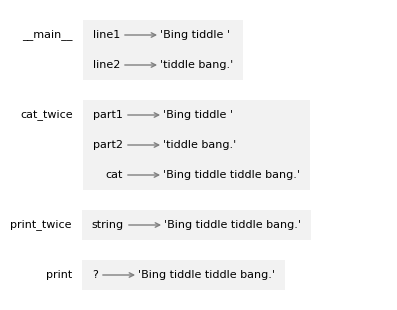
The frames are arranged in a stack that indicates which function called
which, and so on. Reading from the bottom, print was called by print_twice, which was called by cat_twice, which was called by __main__ – which is a special name for the topmost frame.
When you create a variable outside of any function, it belongs to __main__.
In the print frame, the question mark indicates that we don’t know the parameter’s name.
2.5.8. Tracebacks#
When a runtime error occurs in a function, Python displays the name of the function that was running, the name of the function that called it, and so on, up the stack.
To see an example, I’ll define a version of print_twice that contains an error – it tries to print cat, which is a local variable in another function.
def print_twice(string):
    print(cat)
    print(cat)
Now here’s what happens when we run cat_twice.
# This cell tells Jupyter to provide detailed debugging information
# when a runtime error occurs, including a traceback.
%xmode Verbose
Exception reporting mode: Verbose
line1 = 'Bing tiddle '
line2 = 'tiddle bang.'
cat_twice(line1, line2)
The error message includes a traceback, which shows the function that was running when the error occurred, the function that called it, and so on.
In this example, it shows that cat_twice called print_twice, and the error occurred in a print_twice.
The order of the functions in the traceback is the same as the order of the frames in the stack diagram. The function that was running is at the bottom.